Key takeaways
- A scanner that has stopped emailing through Microsoft 365 has usually failed authentication, not hardware.
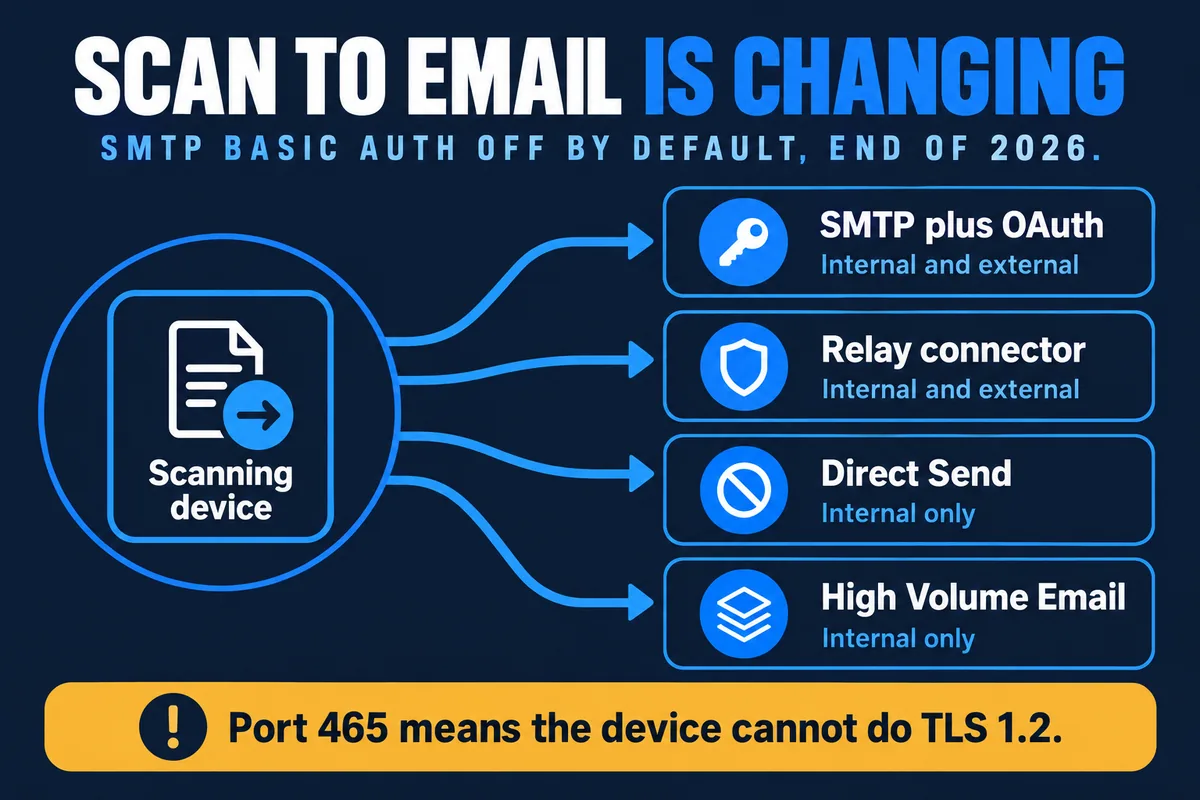
- Microsoft disables SMTP AUTH basic authentication by default at the end of December 2026 on existing tenants, and an administrator can still re-enable it at that point.
- Microsoft will announce the final removal date during the second half of 2027, after which no one can turn SMTP basic authentication back on.
- A device that offers only port 465 cannot do the TLS version Microsoft requires, so it needs new firmware, a relay connector, or replacing.
- Direct Send delivers to internal recipients only, so it cannot be the answer where scans are emailed to clients or suppliers.
- The useful work right now is an inventory: knowing which devices send mail, from which mailbox, by which method.
If a copier or scanner has suddenly stopped emailing scans in a Microsoft 365 environment, the cause is almost always authentication rather than the device. The machine signs in to Exchange Online with a username and password, and Microsoft is withdrawing that method. From the end of December 2026 it is off by default on existing tenants.
This catches people out because nothing visibly changed at the device. The scan still produces a file, the address book is intact, and the test page prints. The send simply fails, often with an authentication error buried in a log nobody looks at, or with no message at all beyond a job that never arrives.
Why has my scanner stopped sending emails?
Multifunction devices are not email servers. They create a message and hand it to something that can send it, and in a Microsoft 365 environment that something is Exchange Online. To be allowed to hand over a message, the device has to prove who it is.
Most devices in the field do that the oldest way available: they send a username and password with every message. Microsoft calls this client SMTP submission, or SMTP AUTH, using basic authentication. It works, it is simple to configure, and it is why the setting on the back of almost every copier in the country says smtp.office365.com with a mailbox address and a password underneath it.
That arrangement breaks in several ordinary ways before any deadline arrives:
- The password on the mailbox the device uses is changed or expires.
- Multi-factor authentication is applied to that account, which basic authentication cannot satisfy.
- Security defaults are switched on in Microsoft Entra ID. Microsoft is explicit that client SMTP submission using basic authentication is not compatible with security defaults.
- The tenant was created after January 2020, in which case SMTP AUTH was off from the start and has to be enabled per mailbox.
Any one of those produces the same symptom. What is new is that the method itself now has an end date.
What exactly is Microsoft changing, and when?
Microsoft has published an updated deprecation timeline for SMTP AUTH basic authentication. It runs like this:
- Until December 2026 – nothing changes. Devices using a username and password keep sending.
- End of December 2026 – SMTP AUTH basic authentication is disabled by default on existing tenants. An administrator can still turn it back on.
- Tenants created after December 2026 – the option is not available at all. OAuth only.
- Second half of 2027 – Microsoft announces the final removal date, after which the setting is gone for everyone.
It is worth being precise about this, because a good deal of coverage is describing the end of December 2026 as a cut-off. It is not. It is a default change with a manual override, and the override survives until the removal date Microsoft has not yet named. The honest planning position is that you have until the end of 2026 before things start breaking, and until some point in 2027 or beyond before the escape hatch closes.
That is not a reason to wait. It is a reason to know, before the end of December, exactly which devices are going to go quiet.
How do I find out which devices are affected?
Three sources, and the third is the one that actually settles it.
The SMTP AUTH clients report
In the Exchange admin center, this lists the accounts and source IP addresses that have submitted mail using SMTP AUTH recently. It is the fastest way to see the shape of the problem, and it is good at finding the things nobody mentioned: the old line-of-business application, the alarm panel, the backup job that emails a report.
Message trace
Message trace shows what each of those accounts has actually sent, which tells you whether a device is emailing scans to colleagues, to customers, or to an address that stopped existing two years ago.
The devices themselves
The reports have a blind spot: a scanner used twice a month may not appear in a short reporting window at all, and it will still break. Walking the fleet and reading the send settings is slower and more reliable. You are looking for smtp.office365.com, port 587 or 25, and a username and password. That combination is the one being withdrawn.
While you are there, note the port options the device offers. If the only choices are 465 and nothing useful, you have found a bigger problem than a setting change, for the reason below.
What are the four ways a device can send mail through Microsoft 365?
Microsoft documents four, and they are not interchangeable. The differences that matter in practice are whether the method can reach recipients outside your organisation, and whether it needs a paid mailbox.
| Method | External recipients | Needs a licensed mailbox | Port | Authenticates by |
|---|---|---|---|---|
| Client SMTP submission with OAuth | Yes | Yes | 587 or 25 | OAuth token |
| SMTP relay connector | Yes | No | 25 | TLS certificate or static IP |
| Direct Send | No | No | 25 | Nothing |
| High Volume Email | No | No | 587 | HVE account or OAuth |
Two of the four cannot send to anyone outside your own tenant. That single fact disqualifies them for most scan-to-email use, because the common reason a scan is emailed at all is to get it to someone who does not work for you.
Client SMTP submission with OAuth
The same protocol the device already uses, with a modern token instead of a password. It keeps everything working as it does today, including delivery to external recipients and a copy in the mailbox's Sent Items. It needs a licensed mailbox, it is capped at 10,000 recipients a day and 30 messages a minute, and critically it needs the device to support OAuth. Newer enterprise multifunction devices generally do. Anything more than a few years old generally does not.
SMTP relay connector
An inbound connector in Microsoft 365 that recognises your device by a TLS certificate, which Microsoft recommends, or by a static public IP address that is not shared with anyone else. The device sends to your tenant's MX endpoint on port 25. It reaches external recipients, it does not need a licensed mailbox, and it can send from an address with no mailbox behind it, which makes it the usual answer where several devices are involved. The cost is that it needs a static IP or a certificate, and your SPF record needs updating so the mail is not treated as spam.
Direct Send
No authentication at all, and internal recipients only. Mail to a Gmail or Yahoo address is rejected outright. Microsoft recommends it only for advanced administrators, and has said it is working on an option to disable it by default. It is the weakest foundation of the four.
High Volume Email
Built for bulk internal mail, also internal only, and not designed for this job. Worth knowing it exists, rarely the right answer for a scanner.
Which option should you choose?
Three questions settle it in most cases.
- Do the scans go to anyone outside the organisation? If yes, Direct Send and High Volume Email are out, and you are choosing between OAuth and a relay connector.
- Does the device support OAuth? Check the firmware and the manufacturer's current documentation rather than assuming. If it does, OAuth is the tidiest answer because nothing else about the setup changes.
- Do you have a static public IP address? If the device cannot do OAuth, a relay connector is the realistic route, and it needs either a certificate or a static unshared IP. Dynamic addresses are not supported.
Where the answer to all three is unhelpful, there are two remaining routes. If you still run an on-premises mail server, the device can relay through that. And if the scans are being emailed to someone who then saves them into a folder or a system, the better fix is to stop emailing them at all and scan straight into document management, which takes Exchange Online out of the path entirely.
Why a device offering only port 465 is a warning sign
Microsoft is unusually direct about this. If a device recommends or defaults to TCP port 465, it does not support the TLS versions required for client SMTP submission, which are TLS 1.2 or TLS 1.3. Port 587 is the one to use, with 25 as the alternative.
A device stuck on 465 is telling you its network stack predates current requirements. Sometimes a firmware update fixes it. Often the device is old enough that no firmware update exists, in which case the choice is a relay connector, relaying through an on-premises server, or replacement. It is worth finding these now rather than in January, because replacement has a lead time and a budget attached to it.
What to do before the end of December 2026
- Inventory everything that sends mail, not just the copiers. Alarm panels, door entry systems, backup software, line-of-business applications and the finance system all turn up on these lists.
- Record how each one authenticates, which mailbox it uses, and which port it is set to.
- Separate the external senders from the internal ones. This decides which methods are even available to each device.
- Check firmware for OAuth support on the devices worth keeping, and get the updates applied.
- Decide the fallback for everything else – relay connector, on-premises relay, or replacement – and budget for it before the year end.
None of this is difficult. It is just invisible until it breaks, and it breaks on a date when a lot of other things are also competing for attention.
How Mastercopy handles this
We sit on both sides of this problem, which is unusual. We maintain the devices under managed print and we run the Microsoft 365 tenants under managed IT, so the audit and the reconfiguration are the same visit rather than two suppliers pointing at each other.
For clients on a managed print contract we are working through fleets now: identifying which devices authenticate how, applying firmware where OAuth support exists, and setting up relay connectors where it does not. Where a device genuinely cannot be brought forward, we say so and price the replacement rather than leaving it to fail in January.
Sources: the sending methods, port requirements, TLS versions and the limits of each option are taken from Microsoft's guidance on setting up a multifunction device to send email using Microsoft 365. The retirement timeline is from Microsoft's updated SMTP AUTH deprecation timeline, and the wider context from deprecation of basic authentication in Exchange Online. Last reviewed 2 October 2026.