Key takeaways
- Microsoft is not retiring multi-factor authentication. It is retiring its own delivery of text-message and voice codes, and every other method continues.
- Microsoft-provided SMS and voice authentication retires on 1 February 2027 for ordinary users, and on 1 July 2027 for Global Administrators and external users.
- Internal guest accounts follow the February date, not the July one, which is the detail most summaries get wrong.
- A user whose only method is a text code is stopped at sign-in and made to register a passkey before they can continue. Microsoft states there is no opt-out.
- Staff with no work smartphone are not stuck: Windows Hello for Business or a FIDO2 security key both satisfy the requirement.
- Organisations that genuinely need text codes can buy them through the Microsoft Security Store from 30 October 2026, at their own telecom cost.
- The work worth doing now is a list of who still relies on text codes, because the report says who is enabled rather than who has no fallback.
Microsoft is withdrawing the text message and the automated phone call as ways of completing multi-factor authentication. From 1 February 2027 it stops sending them to ordinary users, and from 1 July 2027 to administrators. Anyone left with no other method is blocked at sign-in until they register a passkey.
This one is worth getting ahead of because of how it lands. There is no outage, no error message to an administrator, and nothing to notice in advance. One morning a member of staff signs in as usual and meets a screen demanding they set up something they have never heard of, and the help desk gets the call instead of the warning.
What exactly is Microsoft retiring?
Start here, because the headlines have been misleading. Plenty of coverage reads as though multi-factor authentication itself is being switched off. It is not, and an organisation that acts on that reading will do the wrong work.
What is being retired is Microsoft-provided telephony delivery. Today, when a sign-in needs a second factor, Microsoft can text you a six-digit code or ring you and ask you to press the hash key. Microsoft pays for that delivery and it is bundled into the service. That is the part that stops.
Microsoft's position is that these are no longer secure methods. Its own documentation says that SMS and voice are no longer positioned as secure authentication methods and will no longer be provided natively, and points users towards passkeys, which resist phishing, SIM-swap and replay attacks in a way a six-digit code cannot. That is a fair reading of the risk. A code that a person can be talked into reading out over the phone is a shared secret, and attackers have been very successful at getting people to read them out.
Everything else carries on. The Microsoft Authenticator app, a third-party authenticator producing timed codes, Windows Hello for Business, FIDO2 security keys and passkeys are all unaffected.
When does it happen, and to whom?
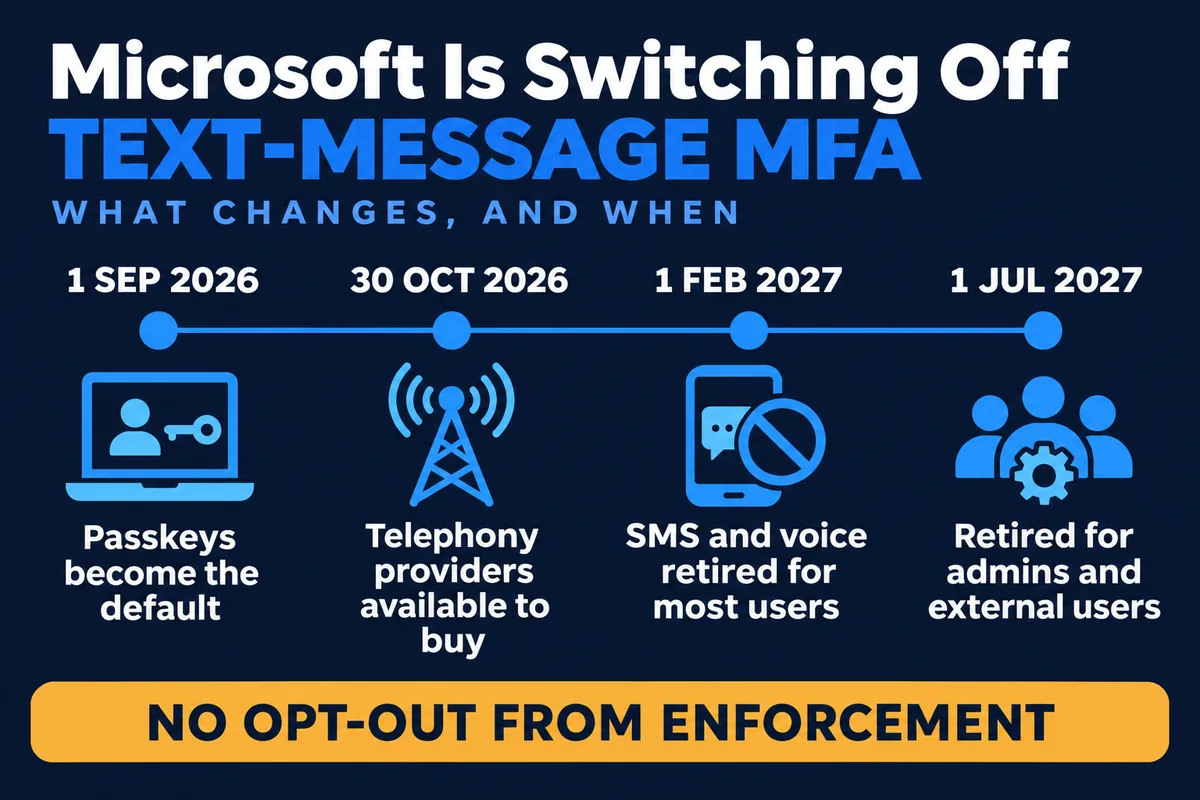
There are four dates, two of which have already passed. The pair that matter are the opposite way round to what most people assume: ordinary staff lose the method before administrators do.
- 1 September 2026 – passkeys became the default sign-in experience. Users enabled for SMS or voice were automatically enabled for passkeys and started being nudged to register one after completing MFA. By default those nudges can be snoozed indefinitely, which is why so little has visibly happened so far.
- 30 October 2026 – organisations that need to keep text or voice codes became able to select a telephony provider through the Microsoft Security Store.
- 1 February 2027 – Microsoft-provided SMS and voice authentication is retired for all users except Global Administrators and external users. Internal guest accounts are in scope for this date.
- 1 July 2027 – Microsoft-provided SMS and voice authentication is retired for Global Administrators and external users.
The internal guest detail is the one to watch. A great deal of secondary coverage says February for staff and July for guests. Microsoft's own guidance says the opposite about internal guests, who follow the February date along with everybody else. If you have contractors, auditors or a parent company's staff in your tenant as guests, check which kind they are rather than assuming July.
Who actually gets blocked?
Only people who have nothing else. This is the distinction that decides how big your problem is.
If a user is registered for the Authenticator app and also has a mobile number on file, the mobile number simply stops being offered. They carry on as normal and may see an occasional skippable prompt to add a passkey. Nothing breaks.
If a user's only available method is a text message or a phone call, Microsoft's wording is blunt: the user is required to register a passkey during sign-in to continue accessing their account, the prompt is blocking, and there is no opt out. They cannot get to their email, their files or anything else until they complete the registration.
That population is usually smaller than the number of people with a phone number registered, and larger than anyone expects. In our experience it clusters in predictable places: long-serving staff who set up MFA years ago and never revisited it, people who declined to put a work app on a personal phone, shared and departmental accounts, and anyone who was onboarded in a hurry.
How do we find out who still uses text codes?
Microsoft publishes a PowerShell script for exactly this, the Entra SMS and voice usage analyzer. Running it needs the Global Reader, Authentication Policy Administrator or Security Reader role.
Two cautions on the output. First, check the legacy per-user MFA settings as well as the modern authentication methods policy. A user switched on for SMS in the old per-user page is still in scope even when the newer policy looks clean, and that is a common way for a handful of accounts to be missed. Second, the report tells you who is enabled for SMS or voice, not who would be blocked. The list you actually want is the subset with no second method registered, and producing it is a filtering exercise rather than a one-line answer.
While you are in there, it is worth noting which accounts are not people at all. Service accounts, shared mailboxes used by a department, and the account that a line-of-business application signs in with are all capable of having a mobile number attached to them, usually somebody's, and they are the ones nobody thinks to migrate.
What do we move people to?
Microsoft's preferred answer is a passkey, and for most office staff it is the right one. A passkey replaces the shared secret with a cryptographic key pair tied to the device, so there is nothing a caller can persuade someone to read out. Microsoft Entra ID supports two kinds:
- Synced passkeys live in a platform credential manager such as iCloud Keychain or Google Password Manager and follow the user across their devices. These suit people who already use that credential manager.
- Device-bound passkeys are created on and stay with a particular device: a passkey in the Microsoft Authenticator app, a passkey on a Windows machine, or a FIDO2 hardware security key.
The practical route for most organisations is a registration campaign, which prompts users to set up a passkey the next time they sign in and complete MFA. It moves people in bulk without a project, and it is far cheaper than doing it one help-desk call at a time in February.
What about staff without a work smartphone?
This is the question that comes up in every conversation we have about it, and the answer is better than people expect: a passkey does not have to live on a phone.
For anyone with their own Windows PC, Windows Hello for Business uses the machine's fingerprint reader, camera or PIN and satisfies the requirement with no phone involved at all. For shared workstations, shop floors, workshops, warehouses and vehicles, a FIDO2 security key is the usual answer. It is a physical object you can buy, issue, log and replace in the same way as any other piece of equipment, and it works on a machine that ten people use.
That matters more than it sounds for the kind of businesses we look after. Asking a warehouse team or a works department to install a work app on their own phones is a conversation that goes badly and sometimes is not lawful to insist on. Buying a tray of security keys is a purchase order.
Can we keep text codes if we really need them?
Yes, but it becomes something you buy rather than something you have. From 30 October 2026 organisations that need to continue can configure a telephony provider through the Microsoft Security Store, with Soprano and Telesign as the first providers available. Microsoft is clear that the telecom costs fall to the customer.
Microsoft's own advice is to scope this narrowly: identify the specific user segments with a genuine regulatory or operational need, document the requirement, and default everyone else to passkeys. We would put it more plainly. Buying a telephony provider for the whole organisation to avoid a migration means paying a recurring bill to keep the weakest method in service, and the migration still has to happen eventually.
There is also a temporary opt-out, and it is narrower than its name suggests. A tenant can be excluded from the automatic passkey enablement and the registration campaign between 1 September 2026 and 1 February 2027 by setting a property through Microsoft Graph. It pauses the nudging. It does not move the retirement. Microsoft states that there is no opt out for enforcement and that the requirement applies to all tenants on the applicable date.
What does this mean for Cyber Essentials?
It changes how you meet the requirement, not whether you can. Cyber Essentials expects multi-factor authentication on cloud services, and a passkey, Windows Hello or a security key all satisfy that at least as well as a text message, which has long been regarded as the weakest of the common methods.
The risk to an assessment is behavioural. The dangerous response to a locked-out user at 8am is to take MFA off the account to get them working, and then not put it back. If you are certified, or working towards it, the migration is worth doing deliberately and recording. Our guides to the 2026 changes to Cyber Essentials and to how Cyber Essentials compares with ISO 27001 set out what the scheme expects of cloud account security.
What to do before February
- Run the usage analyzer and get the list of users enabled for SMS or voice, including the legacy per-user settings.
- Narrow it to the users with no second method registered. That is your actual exposure.
- Separate the people from the service accounts, shared mailboxes and application sign-ins, which need a different answer.
- Decide the method per group: passkey in the Authenticator app for phone users, Windows Hello for desk-based staff, security keys for shared and shop-floor machines.
- Turn on a registration campaign so the bulk of users move themselves rather than through the help desk.
- Tell people what is coming, and what screen they will see, before they see it.
- Decide whether any group has a documented need for telephony, and scope a provider to that group alone.
- Check your Global Administrator accounts separately. They have until July, which is exactly how they get forgotten.
How Mastercopy handles this
For the organisations whose Microsoft 365 tenants we manage, this is work we are already doing: producing the exposure list, agreeing the method for each group of staff, running the registration campaign and supplying security keys where a phone is not the right answer. Where we also maintain the print fleet, we check the device and service accounts in the same pass, because the accounts that copiers, scanners and line-of-business applications sign in with are the ones that fall between IT and facilities. That pairs with the separate change to scan to email on Microsoft 365, which has its own deadline and its own list of affected devices.
If your tenant is managed elsewhere, the list above is enough to brief whoever runs it. The thing we would press on is sequencing: the exposure list is the only part that cannot be done in a hurry in January, because it is the part that tells you how big the job is.
Sources: Microsoft Entra ID documentation on passkeys by default and the retirement of Microsoft-provided SMS and voice authentication; choosing a telephony provider for SMS and voice authentication; planning a passkey deployment; and the NCSC's Cyber Essentials overview. Dates and quoted requirements checked against Microsoft's documentation on 18 November 2026.
← Back to all articles