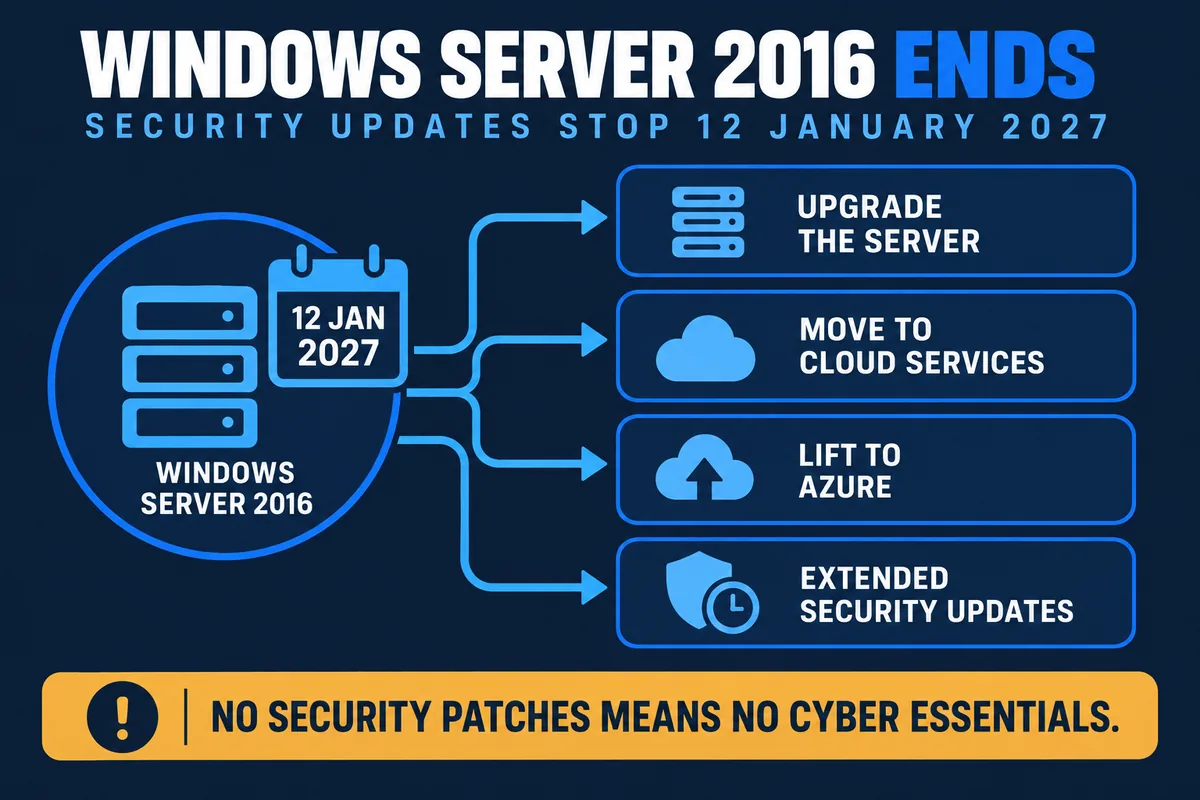
Windows Server 2016 reaches the end of extended support on 12 January 2027. From that date Microsoft stops issuing security updates, bug fixes and technical support. The server keeps running, which is the trap: nothing visibly breaks, while every vulnerability discovered afterwards stays open permanently.
Mainstream support ended back in January 2022, so 2016 has been in its final phase for a while. With roughly four months left, this is the point where planning is still comfortable and cheap. Leave it until December and you are buying hardware in a hurry, at whatever lead time the supply chain offers.
What "end of life" actually means
It does not mean the server switches itself off. On 13 January 2027 it will boot exactly as it did the day before. What changes is that Microsoft stops producing security updates for it, stops fixing bugs in it, and will not take a support case about it.
That matters because vulnerabilities do not stop being discovered when support ends. They keep being found and published, and on an unsupported system there is never a patch. The gap between "working fine" and "quietly indefensible" is where most businesses get caught.
Why this is a business risk, not just an IT job
- Certification. Cyber Essentials requires that in-scope software is vendor-supported and receiving security updates. An out-of-support server operating system fails that control outright, and the 2026 changes to Cyber Essentials tightened this area rather than easing it.
- Insurance. Cyber insurance proposal forms ask directly whether you run unsupported software. Answering yes affects terms, premiums and, in the worst case, whether a claim is paid.
- Tenders and supply chains. Larger customers and public sector buyers increasingly ask the same question, and a wrong answer costs work.
- Ransomware. Unpatched servers are a preferred route in, and a server is precisely where the file shares, backups and credentials live.
- Data protection. Running known-vulnerable systems holding personal data sits badly against the UK GDPR requirement to use appropriate technical measures.
Your four options
1. Move to a current version of Windows Server
The like-for-like route: a new server running a current version of Windows Server, typically on new hardware. Best where you have line-of-business applications that expect a local server, large working files, or connectivity that makes cloud-first awkward. In-place upgrades are possible in some scenarios, but for hardware bought around 2016 a clean build is usually more reliable than carrying a decade of configuration drift forward.
2. Retire the server and use cloud services instead
Many 2016 servers are doing jobs that no longer need a server: file shares that suit SharePoint or OneDrive, an old mail server that belongs in Microsoft 365, or an application whose vendor now offers a hosted version. This is often the cheapest long-term answer, because the hardware refresh cycle disappears along with the server. Our cloud service management covers running it afterwards.
3. Move the workload to Azure
A middle path: the same server workload, lifted to Microsoft's cloud, with capacity you can change and no hardware to replace. It suits organisations who want out of the hardware business without re-engineering applications, and Microsoft's own guidance points at Azure as a primary destination for 2016 workloads.
4. Buy time with Extended Security Updates
Microsoft has confirmed Extended Security Updates for Windows Server 2016, delivered through Azure Arc. ESU keeps security patches coming for a period, at a cost, and is worth considering where a critical application genuinely cannot move by January. Treat it as a bridge with a deadline of its own, not a decision. Confirm current pricing and duration before you budget, as terms change: Microsoft publishes an Extended Security Updates FAQ.
How to choose between them
| If this describes you | Most likely route |
|---|---|
| The server mainly holds files and printers | Microsoft 365, retire the server |
| A line-of-business application needs a local server | New on-premise server, current Windows Server |
| You want out of hardware, but applications cannot change | Migrate the workload to Azure |
| Large files, weak connectivity, rural site | On-premise, or hybrid with local caching |
| A critical system genuinely cannot move by January | ESU as a short bridge, with a dated plan behind it |
What to do in the next four months
- Inventory. List every server, its operating system version, its role, and what depends on it. Old domain controllers and forgotten application servers surface here.
- Check the applications, not just the server. The blocker is almost always a software vendor: does their product support a current Windows Server version, and what does the upgrade cost?
- Check the hardware. Kit bought for Server 2016 is likely out of warranty, with ageing disks. If you are replacing the operating system anyway, the hardware question answers itself.
- Decide the route per workload. It is rarely one answer for the whole estate.
- Book the work early. Lead times on hardware and vendor availability both lengthen as a deadline approaches. December will be busy for every IT provider in the country.
While you are at it, look at the whole estate rather than one box. If any desktops are still on an operating system past its end of support, our guide on what to do about Windows 10 end of support covers that side, and it is far cheaper to plan both together than to do two separate projects.
How Mastercopy handles it
We audit, plan, procure, migrate and then run the result, which means nobody is handing you a new server and walking away. Practically that looks like: a free audit of what you have; a written plan with options and costs; hardware specified and supplied through IT procurement; the migration carried out with cutover planned around your working week; then ongoing managed IT support covering servers and desktops, patching, backup and monitoring, so the next end-of-life date is something we tell you about rather than something you discover.
We are ISO 27001 and ISO 9001 certified and hold Cyber Essentials, all verifiable on our trust centre, with engineers across the Tees Valley and the North East, including Stockton-on-Tees, Middlesbrough, Darlington, Durham and Newcastle.
Frequently Asked Questions
When does Windows Server 2016 reach end of life?
Extended support for Windows Server 2016 ends on 12 January 2027, under the Microsoft Lifecycle Policy. Mainstream support ended in January 2022. After the 2027 date, Microsoft stops issuing security updates, bug fixes and technical support for the operating system.
What happens if we keep running Windows Server 2016 after January 2027?
The server keeps working, which is exactly why this gets ignored. What stops is security patching, so every vulnerability found after that date remains permanently open. In practice the consequences show up as failed Cyber Essentials certification, awkward answers on cyber insurance renewals and supplier questionnaires, and a significantly higher ransomware risk, since unpatched servers are a favourite route in.
Can we buy Extended Security Updates for Windows Server 2016?
Microsoft has confirmed Extended Security Updates will be offered for Windows Server 2016, delivered through Azure Arc, but treat ESU as a bridge rather than a destination. It buys time at a cost, and it does not remove the underlying problem of running an operating system a decade past release. Confirm current pricing and duration with us or Microsoft before budgeting for it.
Do we have to move to the cloud?
No. Moving to Azure or replacing a server workload with a cloud service is one option, and often a good one, but a new on-premise server running a current version of Windows Server is perfectly legitimate. The right answer depends on your applications, your connectivity and how you actually work. Anyone insisting on a single answer before looking at your setup is selling, not advising.
Can we upgrade Windows Server 2016 in place?
Sometimes, but it is rarely the best route for a server that has been in service since 2016. In-place upgrades carry forward years of configuration drift, and hardware of that age is usually out of warranty and near the end of its useful life. A clean build on new hardware or a new virtual machine, with applications reinstalled and data migrated, gives a far more reliable result.
Will an unsupported server fail Cyber Essentials?
Yes. Cyber Essentials requires that software on in-scope devices is supported by its vendor and receiving security updates. An unsupported server operating system is a straightforward failure of the security update management control, and the 2026 requirements tightened this area rather than relaxed it.
How long does a server migration take?
For a single file and print server, typically a few weeks from audit to cutover, most of which is preparation rather than downtime. Where line-of-business applications, databases or third-party software vendors are involved, allow two to three months, because vendor sign-off and licence checks are usually the slowest part. Starting now leaves comfortable room before January 2027.
This is not the only January 2027 deadline in the diary. The PSTN and ISDN switch-off falls on 31 January 2027, three weeks later, and the two are worth planning together rather than twice.
Running Windows 10 desktops alongside that server? Windows 10 ESU Year Two lands in the same planning window.
Sources: dates follow the Microsoft Lifecycle Policy entry for Windows Server 2016 and Microsoft's guidance on planning ahead for Windows Server 2016 end of support, both checked on 16 September 2026. Extended Security Updates terms can change, so confirm current details before relying on them.