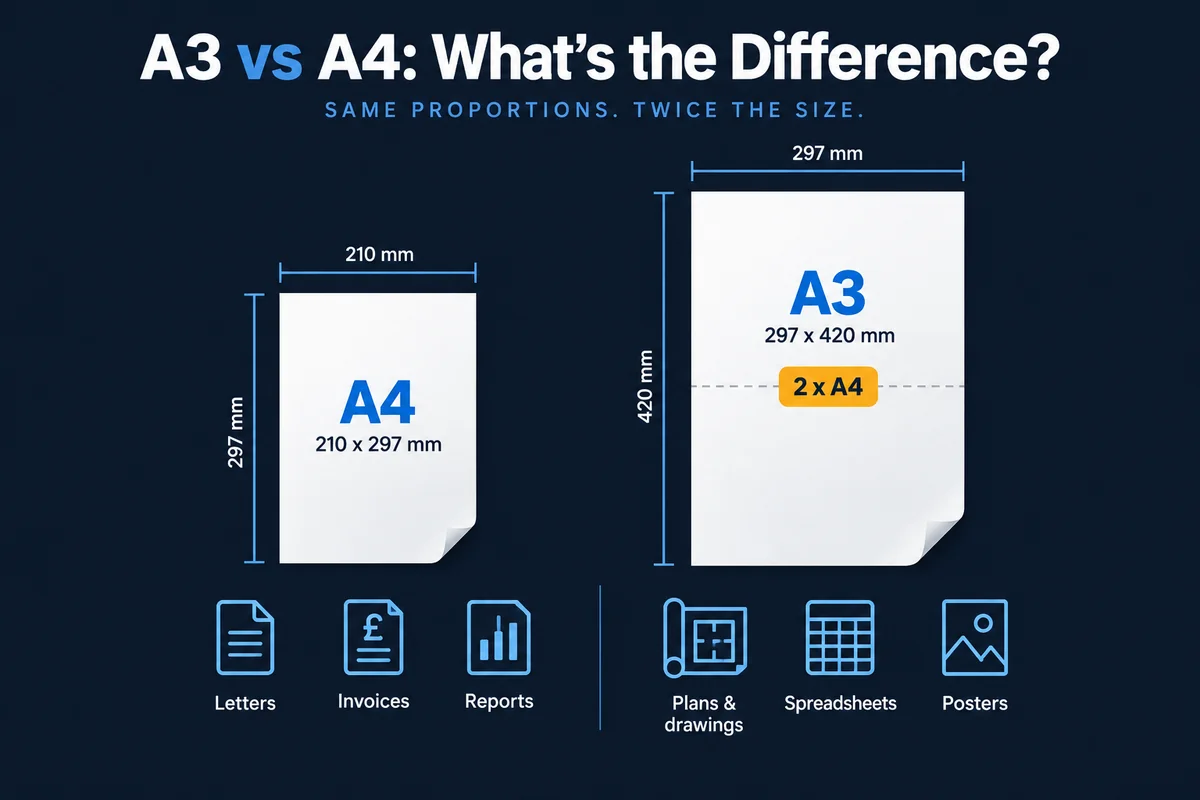
An A3 printer handles paper up to 297 x 420mm, twice the size of A4, as well as everyday A4. You need A3 if you regularly print plans, drawings, wide spreadsheets, posters or booklets, or scan A3 originals. If most of your printing is letters, invoices and reports, an A4 printer is usually the better value.
Getting this right matters more than it sounds. Choose A3 when you do not need it and you pay for a bigger, pricier machine that sits in the corner doing A4 work. Choose A4 when you do need A3 and you end up sending plans and posters out to a print shop every week. This guide explains the real difference between A3 and A4 printers, who genuinely needs A3, what it means for cost and space, and the mixed setups that often work out best.
What is the difference between A3 and A4?
The ISO paper sizes work by halving. A4 measures 210 x 297mm, the standard size for letters, invoices and reports. A3 measures 297 x 420mm, exactly two A4 sheets side by side. An A3 printer can print, copy and scan at A3 as well as A4, while an A4 printer is limited to A4 and smaller.
One point catches people out. Some large office multifunction devices look like A3 machines but their trays stop at Legal size, which makes them A4 devices. If A3 matters, check that both the paper trays and the scanner glass take A3. If you have decided you need A3, our guide to the best HP A3 printers compares the true A3 ranges we supply.
Who needs an A3 printer?
A3 earns its place when larger output is part of normal work rather than an occasional request. Typical examples include:
- Architects, engineers and construction firms – plans, site drawings and markups that are unreadable at A4.
- Schools, colleges and universities – classroom posters, display work and exam papers.
- Marketing and design teams – proofs, presentation boards and point-of-sale material.
- Finance teams – wide spreadsheets and management accounts that need to be read without shrinking the text.
- Anyone producing booklets – A4 booklets are printed on A3 and folded, so booklet finishing needs an A3 device.
- Offices that scan large originals – if A3 documents arrive on paper, you need A3 scanner glass to digitise them in one pass.
Volume matters as well as paper size. A3 multifunction devices are floor-standing machines built for shared, higher-volume use, so they tend to make most sense as the main device for a team printing several thousand pages a month. A small team printing lightly is usually better served by A4.
Is an A4 printer enough for most offices?
For many, yes. Most general offices print letters, invoices, contracts and reports, all of which are A4. If your team only needs A3 a handful of times a month, an A3 device is usually hard to justify on its own. That volume can be handled by a single shared A3 machine elsewhere in the business, or sent out when it is needed.
It is also worth clearing up a common myth: A3 does not mean better quality. Print quality comes from the device and its print technology, so a good A4 printer produces an A4 page every bit as sharp as an A3 machine. Above A3 you are into wide format, where the sizing question changes completely, and our guide to sizing an A0 plotter covers it.
A3 vs A4 printers compared
| Factor | A4 printer | A3 printer |
|---|---|---|
| Paper sizes | A4 and smaller | A3, A4 and smaller |
| Footprint | Desktop or small floor unit | Floor-standing, needs planned space |
| Upfront or lease cost | Lower | Higher |
| Cost per A4 page | Similar on comparable devices | Similar, often lower at higher volumes |
| A3 output | Not possible | Often charged as two clicks |
| Print quality | Depends on the device | Depends on the device |
| Finishing | Basic stapling on some models | Booklet making, hole punching, larger finishers |
| Best for | Everyday office documents, small teams | Busy shared devices, plans, booklets, large scans |
Is an A3 printer more expensive to run?
The device itself is the obvious difference. A3 machines cost more to buy or lease, because they are larger and usually built for higher volumes. The less obvious difference is how printing is charged. Many service agreements charge per page, or per "click", and count an A3 page as two A4 clicks because it uses twice the paper area. That is fair, but it means heavy A3 users should check their contract carefully before comparing quotes.
For A4 output, a comparable A3 device often has a similar cost per page to an A4 device, and at higher volumes it is often lower. So if your A3 machine is also your main shared device, doing most of the office's A4 work, the extra cost is spread across everything it prints.
Three setups that work well
1. A4 throughout
Right for offices that rarely or never need A3. Lower cost, smaller devices, and any occasional large job can be sent out.
2. One shared A3 device, A4 elsewhere
Often the best value for mixed needs. A single A3 multifunction device sits centrally as the main shared machine for print, copy, scan and A3 work, with smaller A4 devices in departments or on other floors.
3. A3 as the main fleet
Right for design, construction, engineering and education settings where A3 is routine. Every shared device handles large output, booklets and A3 scanning, so nobody has to walk across the building for it.
Whichever you choose, security, remote monitoring and managed print work the same way across A3 and A4 devices, so a mixed fleet is just as easy to run.
Not sure how much A3 you really print?
Most businesses guess, and the guess is usually wrong in one direction or the other. A free print audit measures exactly how much you print at each size, in colour and mono, on every device. That turns "do we need A3?" from an opinion into a number. It is also worth reading our guide to choosing an office printer in 2026 for the wider decision.
Frequently Asked Questions
What is the difference between an A3 and an A4 printer?
An A4 printer handles paper up to 210 x 297mm, the standard size for letters, invoices and reports. An A3 printer handles paper up to 297 x 420mm, exactly twice the area of A4, and prints, copies and scans A4 as well. A3 devices are usually larger, floor-standing multifunction machines built for shared use.
Does my office need an A3 printer?
You need A3 if you regularly produce drawings, plans, wide spreadsheets, posters, presentation boards or folded A4 booklets, or if you need to scan or copy A3 originals. If A3 is only an occasional requirement, an A4 device for everyday work, with a single shared A3 device or an outsourced arrangement for the odd large job, is often better value.
Is an A3 printer worth it for a small office?
Only if the office regularly needs A3 output or A3 scanning, or the device will be the main shared machine for a busy team. For a small office printing mainly letters, invoices and reports, an A4 device is usually cheaper to lease and run, and the occasional A3 job can be sent out.
Is an A3 printer more expensive to run?
A3 devices usually cost more to buy or lease and take up more space. Their cost per A4 page is often similar to a comparable A4 device, and at higher volumes it is often lower. Be aware that many print contracts count an A3 page as two clicks, so check how your agreement charges for A3 output before comparing quotes.
Do I need an A3 printer for better print quality?
No. Print quality depends on the device and its print technology, not on the largest paper size it takes. A good A4 printer produces the same quality on an A4 page as an A3 printer. Choose A3 for the paper size, finishing or scanning you need, not for quality.
How much space does an A3 printer need?
A3 multifunction printers are usually floor-standing and noticeably larger than A4 desktop devices, especially with extra paper trays or a finisher fitted. Allow room around the device for loading paper, servicing and people collecting prints, and check the footprint before you order.
How can I tell if a printer is really A3?
Check that the paper trays and the scanner glass both take A3 (297 x 420mm). Some large office devices look like A3 machines but their trays stop at Legal size, which makes them A4 devices. A supplier should confirm the maximum media size for print, copy and scan before you commit.
Want a straight answer for your office? Call Mastercopy on 01642 750404 or email sales@mastercopy.co.uk and we will help you work out whether A3, A4 or a mix makes sense.